Xchar AI

User rating 4.7/5

Xchar AI is an online platform that lets you create, customize, and interact with AI characters-primarily marketed as realistic AI girlfriends and companions. Users can design their character AI NSFW appearance and personality, engage in real-time conversational chats, and even generate AI images of their characters. The service supports private, personalized interactions and offers both safe-for-work and unfiltered NSFW experiences, with features meant to make conversations feel immersive and tailored to the user’s preferences.

How to create an account

  • Go to the website Xchar AI
  • On the homepage click, login or register, In the popup, make sure the register tab is selected.
  • Choose how you want to sign up, google or email.
  • Click “sign up with google” and follow the google prompts.
  • Click “sign up with email” type your email address, and create a strong password.
  • Tick “I agree to the Terms of Service and Privacy Policy.”
  • Tick “I agree to the community guidelines.”
  • Tick “I would like to receive discounts and updates.”
  • Press the “sign up” button at the bottom of the popup.
  • Check your inbox for a message from Xchar AI and click the verification link, if they send one.

After this, your account should be created and you can log in and start using Xchar AI.

Create Xchar AI account

User experience & interface

Xchar AI features a sleek, dark-themed interface designed for smooth browsing and visual immersion. The left-side navigation bar gives quick access to character creation, feeds, conversations, and premium features. Large, scrollable content cards showcase AI characters in a clean, modern layout, making exploration easy and engaging. The interface is simple, intuitive, and focused on delivering a highly visual, user-friendly experience.

User experience & interface

Create your AI character

Xchar AI you can design your own AI companion by choosing how they look, act, and talk. The “create your dream AI character” page lets you pick between quick setup or full customization, then guides you through naming, shaping the personality, and generating images so the AI feels unique to you.

  • Log in to your account on Xchar AI.
  • On the left sidebar, click the “+” (Create character) icon.
  • On create your dream AI character, choose a mode: simple, advanced, or custom (premium).
  • Enter character basics-name, short description, and personality traits.
  • Set appearance-write an appearance prompt and/or choose a visual style, then generate or pick an image.
  • Review the personality and appearance details and adjust anything you want.
  • Click create / save to finish.

Go to my characters, select your new character, and click chat to start talking.

Xchar AI create your character

Generate your AI image & video

Xchar AI you can turn your prompts and characters into AI-generated images or short clips. You pick a character or write a description, choose image or video, adjust a few settings, and the platform automatically creates the visuals for you.
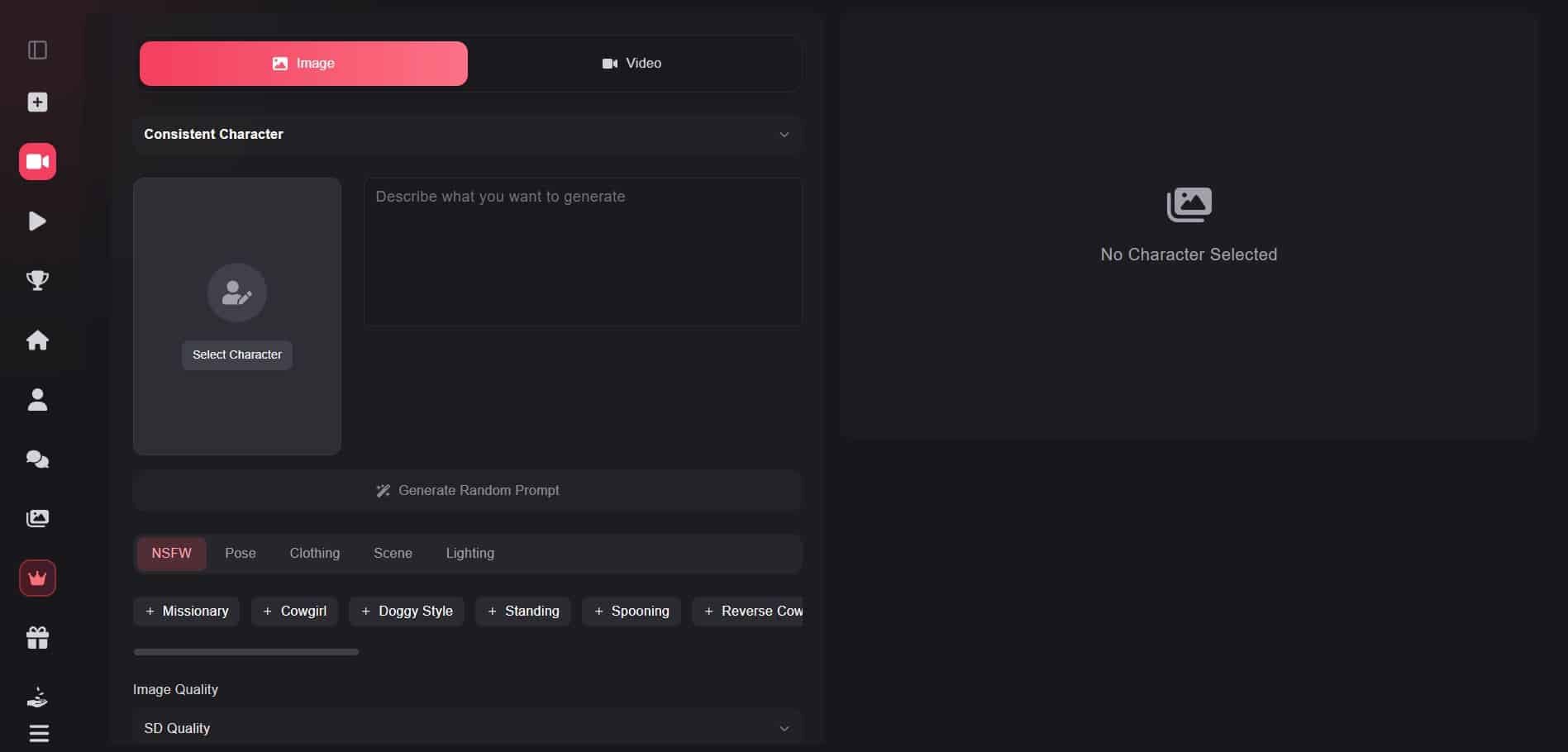
  • Log in to your Xchar AI account.
  • In the left sidebar, click the generate section (image / video icon).
  • Choose what you want to make, image or video.
  • Select a character from your list or write a text prompt describing the scene and appearance.
  • Pick your style / options (e.g. realism vs anime, camera angle, etc., if available).
  • Click generate and wait for the result to appear.
  • Review the output, if you don’t like it, tweak the prompt or settings and regenerate.
  • When satisfied, save, download, or add it to your gallery/feed.
Xchar AI Generate your image & video
Xchar AI generate your image & video

Open conversation

Xchar AI, you can interact with your AI characters through flexible and immersive messaging. The platform supports natural text chat, AI porn chat, voice messages, quick-reply buttons, emotional or tone-based messages, and role-play prompts that let you handle any situation. Whether you want casual conversation, fun flirting, deep storytelling, or mature chat (when enabled), the AI ​​instantly adapts to your style, making every interaction personal and engaging.

Xchar AI open conversation

Free vs premium

Free plan:

  • Basic chat access.
  • Limited credits.
  • Limited image/video generation.
  • Standard AI responses.
  • Core features only.

Premium – $14.95/month

  • Unlimited messages.
  • 8,000 credits/month.
  • SD image quality.
  • SD video quality.
  • 6K context window.

Deluxe – $29.95/month (Best seller)

  • Unlimited messages.
  • 32,000 credits/month.
  • SD image quality.
  • SD video quality.
  • 12K context window.

Ultra – $49.95/month (Best value)

  • Unlimited messages.
  • 64,000 credits/month.
  • HD image quality.
  • HD video quality.
  • 18K context window.
  • Ultra language models.
Xchar AI pricing
Xchar AI pricing

Pros

  • You can design characters with unique names, personalities, and looks that match your preferences.
  • Chat with AI in natural language, including text and voice, for more engaging and realistic interactions.
  • Generate visuals and clips based on your character or prompts, adding creative depth to the experience.
  • Paid plans allow unlimited conversations, so you can talk as much as you want without restrictions.
  • The platform has a clean, user-friendly layout that makes navigating feeds, chats, and creation tools simple and enjoyable.

Cons

  • Many advanced features require a paid subscription.
  • Free credits are limited, restricting image/video generation.
  • HD image and video quality only available on higher tiers.
  • Can be slow or costly for heavy users who generate a lot of content.
  • Some features (like Custom characters) are locked behind premium plans.

Review

Xchar AI is a creative and immersive AI chat platform that lets you design, customize, and interact with virtual characters in realistic, engaging conversations. The interface is visually appealing and user-friendly, with a dark theme and intuitive navigation that makes exploring characters and chatting feel smooth and natural. One of the platform’s strongest points is its customization-users can create unique AI characters, defining their personalities, backstories, and appearance. Beyond text, Xchar AI supports voice messages and AI-generated images and videos, giving interactions a richer multimedia depth.

Free users can enjoy basic chat and limited credits, but unlocking the full potential-such as high-quality visuals, large credit allowances, and advanced character controls-requires a premium subscription. Premium plans offer unlimited messaging, higher context windows for deeper AI understanding, and better output quality. While many features are behind paid tiers, Xchar AI delivers a compelling blend of creativity, personalization, and engaging AI communication. Whether you want lighthearted roleplay, visual character creation, or deep conversational experiences, it’s an entertaining platform with a lot of flexibility.

FAQ

A platform where you can create and chat with customizable AI characters, including AI girlfriends.
Yes, you can design their look and personality.
Yes, Xchar AI allows adult and unfiltered interactions.
Yes, conversations are encrypted and kept confidential.
Yes, it uses memory features to personalize interactions.

MOST POPULAR AI PORNSTARS

PORNSTAR ON:

Xchar AI Logo

PORNSTAR ON:

Xchar AI Logo

PORNSTAR ON:

Xchar AI Logo

POPULAR CATEGORIES

AI Porn Website

This website is only intended for users over the age of 18.

AI Porn Website

This is an adult website

This website contains age-restricted materials including nudity and explicit depictions of sexual activity. By entering, you affirm that you are at least 18 years of age or the age of majority in the jurisdiction you are accessing the website from and you consent to viewing sexually explicit content.