BestFaceSwap

www.bestfaceswap.ai

User rating 4.7/5

BestFaceSwap

BestFaceSwap AI is an online face-swapping tool built for anyone who wants to create fun edits or professional-looking media. It blends advanced machine learning with a simple interface. Trusted by thousands of users, it lets you put your face (or a friend’s) into photos, GIFs, or videos of anything, movie scenes, memes, celebrities, and more, with impressive realism. You can try out the basic features for free, or upgrade to Premium for heavy-duty use and extra perks.

How to create an account

BestFaceSwap log in
BestFaceSwap log in

Getting started with BestFaceSwap is quick and easy:

  1. Go to bestfaceswap.ai in your browser. At the top right of the page, click “Sign Up”.
  2. Sign up with Google or Email. You can connect your Google account for one-click access, or enter your email address and choose a password.
  3. Confirm your email (if needed). Check your inbox for a confirmation link and click it. This step usually takes just a moment.
  4. Log in and you’re done! Once signed up, you’ll be logged in automatically.

That’s it, no long forms or credit cards are required to try the service. As soon as your account is created, you’ll get a small amount of free credits to start swapping faces right away.
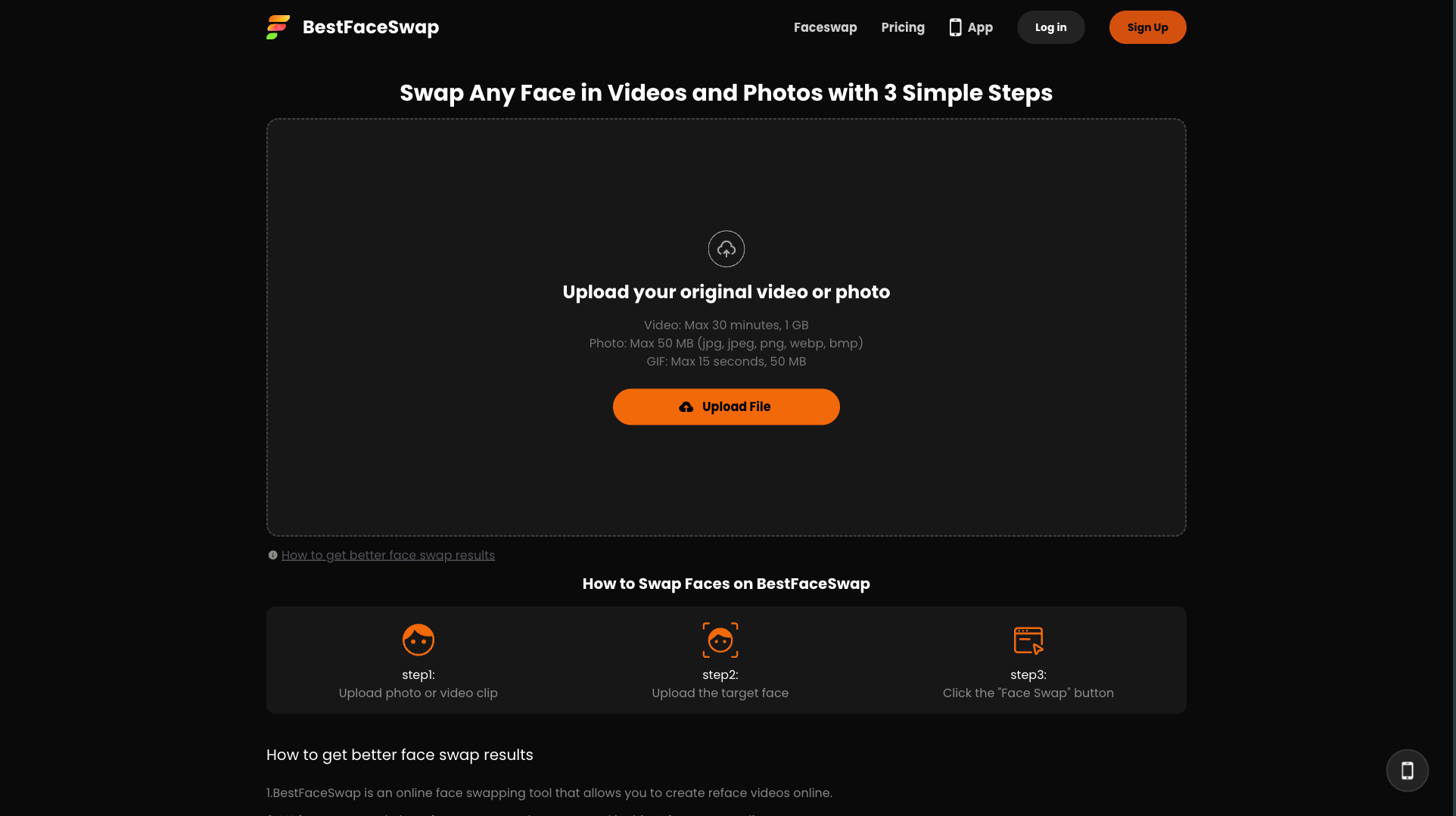
How it works

BestFaceSwap tool
BestFaceSwap tool

Using BestFaceSwap is straightforward and broken into a few simple steps:

  1. Choose Photo or Video mode. From the top menu, pick whether you want to swap faces in a Photo (or GIF) or in a Video. Each option has its own upload page.
  2. Upload your original media. Click the upload area to select a photo, GIF, or video from your device (or drag-and-drop it). The tool automatically detects faces in images or videos.
  3. Select faces to swap. If your media has more than one face, click on the face(s) you want to replace. If it’s just you, it will auto-select.
  4. Choose the new face. Upload the image of the face you want to insert, or pick from one of our preset face templates. The AI will align this face onto the detected face(s) in your original media.
  5. Click “Swap” and wait. Hit the “Swap” (or “Generate”) button. The advanced AI works behind the scenes, matching facial features, expressions and lighting, to blend your chosen face onto the original. This usually takes only a few seconds.
  6. Preview and save your result. Once processing finishes, you’ll see the face-swapped image or video right on the page. If you like it, simply click “Download” to save it. If not, you can try again with a different face or tweak your selections.

Throughout the process, on-screen prompts and clear buttons guide you. There’s no need for manual editing: the AI handles all the hard work of lining up eyes, nose, mouth, and even shadows. You’ll watch as your face (or someone else’s) seamlessly replaces the one in the photo or video.

User experience and interface

BestFaceSwap interface

The BestFaceSwap website is designed to be clean and user-friendly. When you arrive, the large menu bar at the top lets you instantly pick “Photo Face Swap” or “Video Face Swap”. Each section has a clear, step-by-step layout:

  • Photo face swap page: You’ll see a big upload box with a camera icon. Clicking it lets you choose an image (or GIF) from your device. Below that, sample templates and a gallery inspire ideas (movie scenes, celebrity faces, art, etc.). The UI uses bright colors and simple icons so it’s obvious what to do. Once your photo is uploaded, face detection runs automatically. If multiple faces are found, you can click on the ones to replace. Then you hit the big “Swap” button right beneath the image preview.
  • Video face swap page: Similar in style, this page prompts you to upload a video file or even record one with your webcam. After uploading, it scans for faces frame by frame. You select the face(s) to swap and the replacement face to use. A prominent “Swap Video” button starts the process. A progress indicator (like a loading circle) shows how the conversion is going.

On both pages, once the swap is done, the result appears in the same area. You get a live preview and a “Download” button below it, so saving your creation is straightforward. The site also keeps previous swaps in your account history for easy access.

We’ve kept the design uncluttered: plenty of white space, legible fonts, and concise instructions. This makes it easy to focus on the fun part, swapping faces, without distractions. The interface is also fully responsive. That means whether you use BestFaceSwap on a laptop, tablet, or phone, the layout adapts smoothly. All buttons and features are accessible on smaller screens, so you can swap faces on the go.

Overall, the user experience is smooth and friendly. From sign-up to first swap, everything flows logically with helpful prompts. Even if you’ve never done face swapping before, the clear labels (“Upload photo,” “Select face,” “Download result”) make it feel as easy as using a social media app.

Pricing and membership breakdown

BestFaceSwap offers a free-to-try model with an optional premium subscription for power users.

  • Free account: Create an account at no cost, and you’ll receive a modest number of free credits. These let you experiment with photo swaps and short videos right away. Each swap deducts credits (for example, swapping a small photo might cost 0.5 credits, a 15-second video might cost 5 credits, etc.). You can earn a few extra free credits by completing actions (like referring friends), or you can simply use the free tier to see if you like the results. Once free credits run out, you can still use the service by purchasing additional credit packs or upgrading.
  • Premium subscription ($19.99/month): Upgrading to Premium unlocks the full power of BestFaceSwap. Premium users get 100 credits per month, so you can swap many faces without worrying. You also enjoy priority processing speed (so your swaps finish even faster), no upload limits (support for videos up to 30 minutes and up to 1 GB file size), and discounts on extra credit bundles if you need them. Premium members get a 50% off deal on the first month as a welcome gift. Importantly, Premium removes any hidden fees, for example, you won’t pay extra just because you uploaded a bigger file. Cancel anytime from your account settings if you change your mind.
BestFaceSwap pricing

Pros and cons

Pros:

Realistic results: The AI produces high-fidelity face swaps, with very few obvious glitches or mismatches.
Very easy to use: Intuitive interface and one-click swaps, no photo-editing skills or software are required.
Fast processing: Thanks to powerful servers, most swaps (even HD videos) are done in seconds.
Versatile creativity: Great for memes, fun edits, art projects or even professional headshots, the possibilities are endless.
No watermark: Your final image or video comes clean, with no logos or watermarks obscuring the result.
Cross-platform: Works on any modern browser (Chrome, Safari, etc.) and device (Windows, Mac, iOS, Android).

Cons:

Limited free usage: Free accounts get a small amount of credits and will quickly run into swap limits for heavy use.
Content restrictions: Adult or explicit images (nudity, sexual content) are not allowed. If you try to upload such content, it will be blocked by our filters.
Large or long videos cost more: High-resolution photos and long videos consume more credits and processing time, so you may need the Premium plan for those.
AI isn’t perfect: Very unusual angles, lighting, or multiple overlapping faces can sometimes confuse the algorithm, leading to minor artifacts in rare cases.
Internet required: Since it’s a web app, you need an internet connection to upload and download your swaps (no offline mode).

In short, the free tier is perfect for casual use and short experiments. If you plan to swap faces regularly, create longer videos, or just want faster service, the Premium plan provides a great value. All payment transactions are handled securely, and you can manage or cancel your subscription from your profile page at any time.

Review

BestFaceSwap stands out as one of the most accessible and reliable AI face-swapping tools available today. The site combines advanced technology with a very straightforward interface, which makes it appealing to both casual users who want to have fun and those who need professional-quality edits.

The results are generally realistic, with smooth blending that captures facial expressions and lighting naturally. The ability to swap faces across photos, GIFs, and videos adds versatility that many competing tools lack. Processing speed is also impressive, with most swaps finishing in seconds, even for high-quality media.

From a usability perspective, the clean layout and step-by-step process make it easy for anyone to use, even if they have never edited images before. The platform is also fully web-based, meaning there is no need for downloads or installations, and it works equally well on desktop and mobile devices.

In terms of limitations, free users may find the credit system restrictive if they plan to use the tool often, and some complex scenes or unusual angles can produce less-than-perfect results. However, the Premium plan provides enough credits and faster speeds to cover heavy use, and the AI continues to improve with time.

Overall, BestFaceSwap delivers a polished and enjoyable experience that balances fun, creativity, and high-quality output. It is a trustworthy choice for anyone looking to explore face-swapping, whether for memes, entertainment, or more creative projects.

FAQ

Basic use is free. After you sign up, you get some complimentary credits to try out swaps. If you upgrade to Premium ($19.99 per month), you get 100 credits each month and access to all features and higher limits. Cancel anytime. (First month of Premium is 50% off!)
You can swap faces in regular photos (JPEG, PNG), animated GIFs, and videos (commonly MP4, MOV, etc.). In each case, you upload your file and then choose which face to replace.
Yes. BestFaceSwap prohibits any explicit or obscene material. In other words, no nudity, pornography, or sexually explicit images. Our content filters will block and delete such uploads. You also should not swap faces in images with minors or any copyrighted content you don’t own. Basically, keep it respectful and fun for all ages.
Absolutely. All data transfers are encrypted (HTTPS). We only use your photos/videos to do the face swap and do not share them publicly. You retain ownership of your uploads. For full details, see our Privacy Policy. We do perform automated scanning to enforce content rules, but otherwise your media stays secure and accessible only to you.
Most photo swaps finish in just a few seconds. Short videos (like under a minute) often take a few more seconds to process. Very long or high-resolution videos take longer, premium users get priority speed on those. You’ll see a progress bar or spinner while the AI works, and the final result appears as soon as it’s ready.

MOST POPULAR AI PORNSTARS

PORNSTAR ON:

Bestfaceswap logo

PORNSTAR ON:

Bestfaceswap logo

PORNSTAR ON:

Bestfaceswap logo

POPULAR CATEGORIES

AI Porn Website

This website is only intended for users over the age of 18.

AI Porn Website

This is an adult website

This website contains age-restricted materials including nudity and explicit depictions of sexual activity. By entering, you affirm that you are at least 18 years of age or the age of majority in the jurisdiction you are accessing the website from and you consent to viewing sexually explicit content.