

Magik Face is an advanced AI-powered creative platform designed to transform ordinary photos into professional-quality portraits, artistic images, and animated videos in just a few clicks. By using cutting-edge artificial intelligence, Magik Face allows users to train a personalized AI model in approximately two minutes, enabling highly realistic and consistent results that closely resemble the original subject. The platform offers over 100 unique styles, ranging from realistic studio photography to fantasy, anime, cinematic, and artistic looks. Users can easily generate content suitable for social media, personal branding, marketing, avatars, profile pictures, or creative projects, without needing photography skills or expensive equipment. In addition to still images, Magik Face also supports AI video generation, turning photos into expressive, dynamic animations.
Accept terms / privacy policy if prompted, you may be taken to your dashboard where you can start creating.

The Magik Face playground is an interactive creative space where users can generate AI-powered images using simple text prompts. In the playground, you describe your creative idea, choose between a general flux model or your own custom flux model, select the desired image size and aspect ratio, and optionally apply style enhancements to shape the final look. Once the settings are selected, you generate the image using rubies (credits), and the result appears instantly in the preview area. The playground is designed to be easy to use while giving creators full control over style, composition, and creativity, making it ideal for experimenting with ideas and producing high-quality AI images quickly.
Then see how your image appears in the preview panel.

Magik play is the video creation tool in Magik Face that allows users to generate AI-powered videos from images and text prompts. In this workspace, you upload an image or paste a URL, optionally apply a ”LoRA” for style or character consistency, and describe how you want the video to look using a text prompt. You can choose the video duration (such as 5 or 10 seconds), accept the terms, and generate the video using rubies (credits). Once processed, the AI-generated video appears in the preview area, making magik play an easy and creative way to turn static images into dynamic AI videos. See below how to make it.
If you want a better result, edit the prompt, change duration or ”LoRA”, and generate again.

Training a custom AI model in Magik Face allows you to create a personalized flux model using your own images. By uploading 10–30 clear, well-lit photos of a subject from different angles and poses, you can train an AI model that accurately captures their appearance and style. After naming the model, accepting the terms, and starting the training process using rubies (credits), the system processes your images to build a unique model that can later be used in the playground to generate new, high-quality AI images in various poses, scenes, and artistic styles while maintaining strong likeness and consistency.

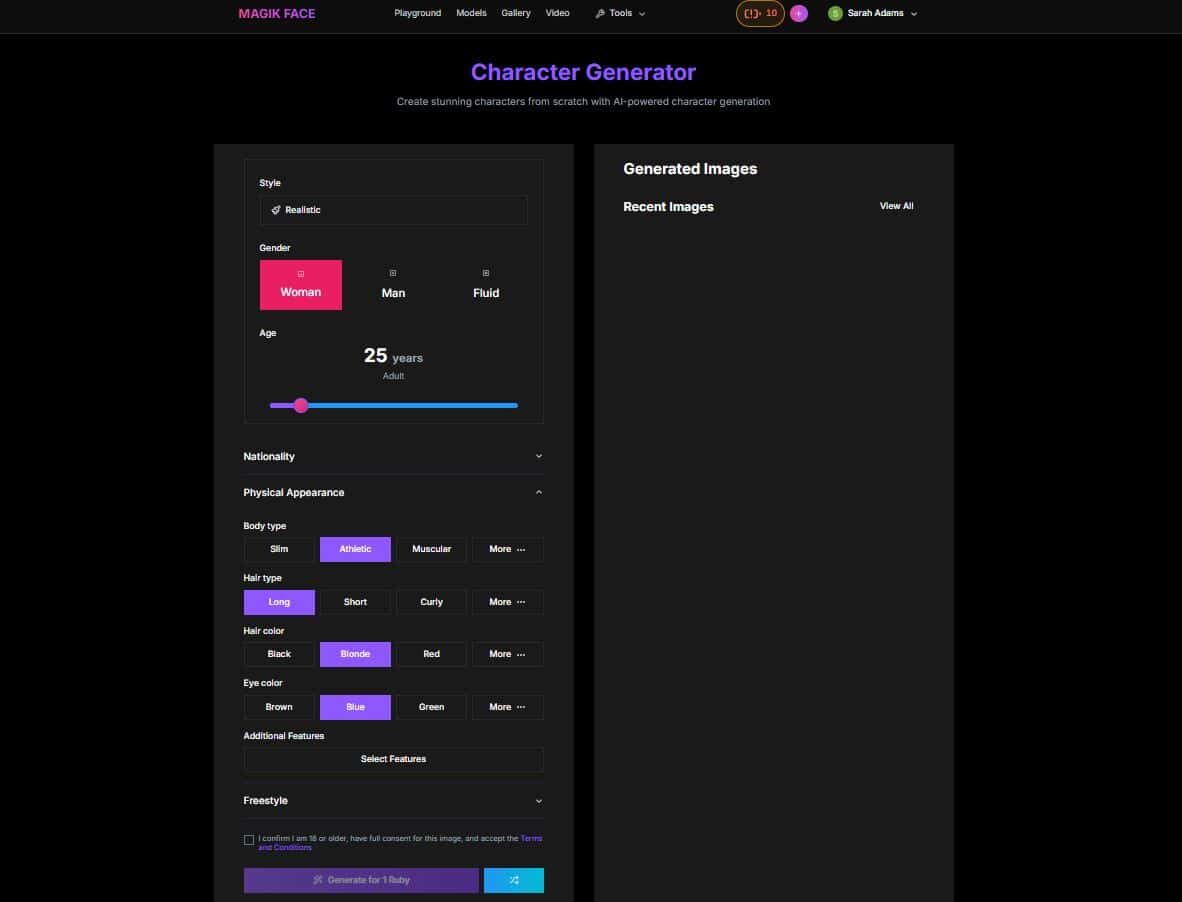
The Magik Face character AI NSFW generator lets you create stunning, fully original characters from scratch using AI-powered tools. You can customize every detail, including style, gender, age, nationality, body type, hair style and color, eye color, and additional features, all through an easy-to-use interface. By adjusting these options or adding freestyle inputs, the AI generates realistic or stylized characters tailored to your vision. With just one click and a small credit cost, you can instantly bring unique characters to life, making it ideal for creative projects, storytelling, avatars, and concept design.
You can adjust any settings and generate again until you get the perfect character.
Magik pose is an innovative AI-driven tool available on the Magik Face platform, designed to empower users in generating captivating poses and scenes from uploaded images. By leveraging advanced artificial intelligence, it transforms a provided face or image into dynamic, customizable poses integrated into various scenes, making it ideal for creative projects, digital art, or fun experimentation. The tool emphasizes user responsibility with age restrictions and consent requirements, operating on a credit system called “rubies” where each generation costs a set amount, starting with 10 free rubies for new users. It’s accessible via a user-friendly web interface that supports image uploads, URL inputs, or even webcam snapshots for quick starts.

Magik style is an advanced AI-powered tool on the Magik Face platform that allows users to transform their uploaded images through style transfer techniques, applying artistic or thematic styles to create visually stunning variations. It leverages artificial intelligence to seamlessly blend the content of the original image with selected styles or scenes, making it perfect for digital artists, content creators, or anyone looking to experiment with image aesthetics. The tool operates on a ruby-based credit system, with new users starting with 10 free rubies, and emphasizes ethical use by requiring age verification and consent for images. Accessible via a sleek web interface, it supports various input methods like file uploads, URLs, or webcam snapshots, and displays generated results in a dedicated section for easy viewing and management.

Magic touch is a cutting-edge AI tool integrated with the Magic Face platform, which specializes in transforming uploaded images with sophisticated touch effects such as automatic retouching, beauty enhancement, filters, or artistic modifications to refine and enhance visual content.

New users typically receive 10 free rubies upon signing up, allowing limited testing of tools (e.g., a few generations in magik pose, style, or touch, often at 1 ruby per action). You can browse the interface, view examples, and access basic features, but generations are restricted once free rubies are used up. No ongoing free generations or advanced features without purchasing.

Magic Face is a versatile AI-powered platform that specializes in facial transformations, offering tools like magic pose for dynamic scene integration, magic style for artistic transitions, and magic touch for enhancement and retouching. It stands out with fast AI model training, high-quality output, and a ruby-based credit system that lets users start with a free trial, making it accessible to creators experimenting with portraits, virtual models, or marketing visuals. It’s a relatively new or niche tool, considering it’s a relatively new tool-the interface is intuitive, the results are impressively realistic, and features like expression control and style variety offer powerful creative potential for both casual users and professionals, though as adoption grows, a deep community backlash is likely.


